Accord
A society of AI agents that build real software, together — on an infinite canvas, powered by Qwen Cloud.
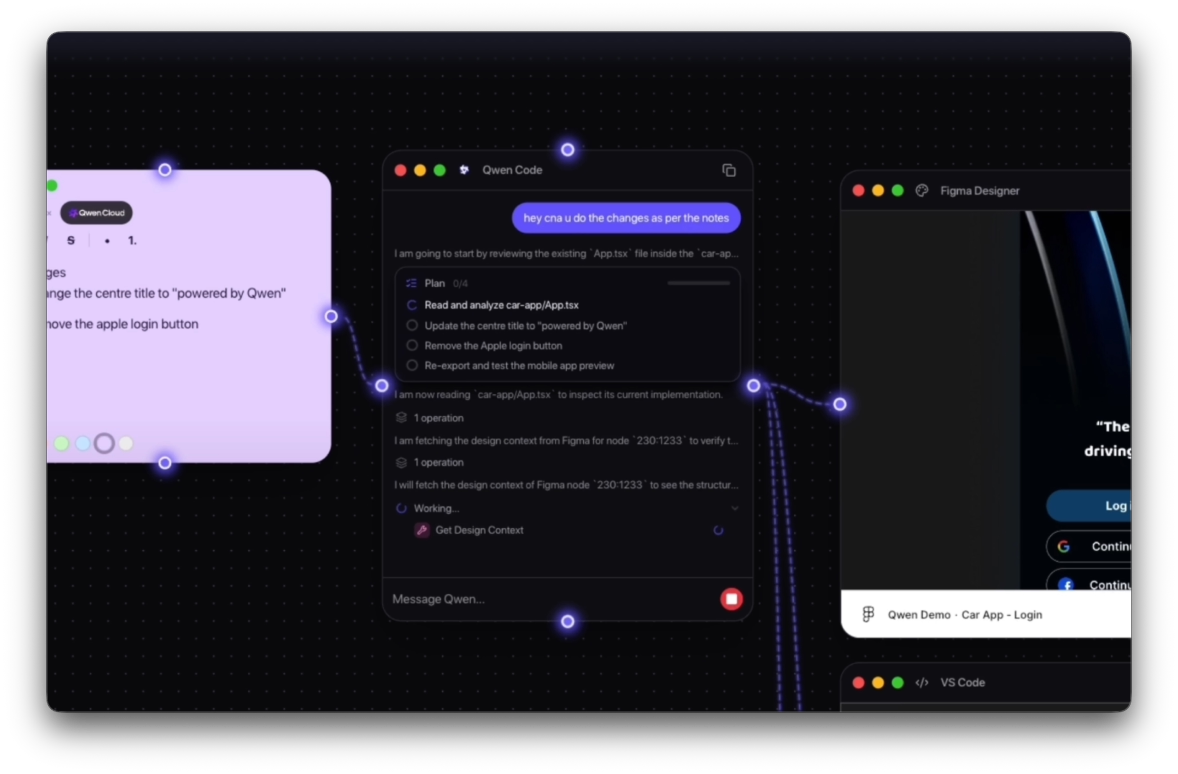
Accord is a visual workshop for multi-agent coding. You compose intent on an infinite canvas — wire a prompt, a Figma design, and notes into a Qwen chat node — and a master agent plans the build, delegates to specialist sub-agents, and mirrors their work as live windows on the same canvas: VS Code, terminal, browser preview, mobile preview, and clarifying questions. Each project runs in an isolated Docker sandbox. Reasoning and code generation are powered by Qwen models on Alibaba Cloud via DashScope. Built for the Qwen Cloud Hackathon — Track 3: Agent Society.
Overview
Most AI coding tools are a single chat box. You type, the model responds, tools run somewhere in the background, and you hope the result matches what you had in mind. Context is pasted in. Execution is invisible. Collaboration is sequential.
Accord is different.
An agent society on an infinite canvas. You drag nodes — a Qwen chat, a Figma design, sticky notes — and wire them together. Qwen acts as the master agent: it reads every connected node, decomposes the goal into roles, and delegates to specialist sub-agents that appear as live windows on the same canvas. A Coder writes in VS Code. A Verifier runs the live web and mobile preview. A Negotiator asks clarifying questions when the team hits a fork — Expo vs Flutter, layout choices, trade-offs.
Each project runs in its own Docker sandbox on Alibaba Cloud ECS. Reasoning and code generation flow through Qwen models on Qwen Cloud (DashScope, OpenAI-compatible API).
Built for the Qwen Cloud Hackathon — Track 3: Agent Society.
The Problem
AI-assisted development has converged on a single pattern: one thread, one assistant, hidden tool calls. That works for small tasks. It breaks down when building real software — where design context, specs, code, previews, and human decisions all need to flow between specialists.
Context is fragmented. You paste Figma links into chat, copy specs from Notion, switch to a terminal, open a browser preview in another tab. Nothing is spatial. Nothing is wired.
Execution is invisible. The agent runs tools you never see. You don't watch code being written, the terminal running, or the preview updating — unless you manually open each surface.
Collaboration is single-threaded. One agent does everything sequentially. There's no task division, no parallel roles, no negotiation when the model disagrees with itself or needs your input on a genuine fork.
Accord was built to show what multi-agent software development looks like when you can see the whole society working — on one canvas.
The Solution: Agent Society on a Canvas
Accord reframes AI coding as orchestration, not conversation.
Compose on the canvas
Drag nodes onto an infinite React Flow canvas. Add a Qwen chat node for the master agent. Wire in a Figma Designer node for pixel-accurate design context. Attach Notes for specs and links. Draw edges between nodes — that's how context flows.
Qwen plans and delegates
The master agent reads every wired node, builds a mental model of the goal, and decomposes it into roles:
- Builder — writes and edits code in a live VS Code node
- Verifier — runs the app in web and mobile previews, reports build errors back
- Negotiator — surfaces clarifying questions in a form node when choices can't be inferred
Tool calls auto-spawn the relevant canvas windows. You don't open VS Code manually — the agent opens it for you when it starts coding.
Specialists collaborate
Sub-agents don't work in isolation. A build error caught by the Verifier loops back to the Builder. Genuine ties — Expo vs Flutter? — escalate to you through a Form node. The society talks, negotiates, and converges.
What You Can Do
- Prompt once, watch the team work — scaffold a Next.js or Expo app, see code, terminal, and preview nodes appear as the agent runs
- Wire Figma into the agent — embed a design, connect it to Qwen, and let Figma Desktop MCP supply design context when relevant
- Live previews — Safari-style web preview and iPhone-frame mobile preview, running inside isolated Docker workspaces
- Clarifying questions — form nodes when the agent needs a human decision instead of guessing
- Guest login — no credentials required for demos; Continue as Guest and start building
- Web or desktop — Electron app locally, or the same experience in a browser at qwen.accord.heysam.dev
Technical Architecture
Three tiers: Client → Accord Server → per-workspace Docker sandboxes, with Qwen Cloud as the AI plane.
Frontend — React + Vite + React Flow The infinite canvas, specialist nodes (Qwen chat, VS Code, terminal, preview, mobile, Figma, notes, form), macOS-style dock, and Zustand state. Ships as an Electron desktop app or a static web build served same-origin by the backend.
Accord Server — FastAPI on Alibaba Cloud ECS
Workspace registry in PostgreSQL. Docker orchestrator that spins up one isolated container per project. Reverse proxy for HTTP, SSE, and WebSocket traffic to in-container services. Reads Qwen auth from root .env and injects it into every workspace at creation time.
Bridge — inside each workspace container
Path-hardened file API, terminal PTY over WebSocket, dev-server manager, agent sessions streamed as SSE, and custom MCP tools: scaffold_from_template, start_dev_server, spawn canvas nodes, Figma MCP bridge. Launches code-server and app dev servers inside the sandbox.
Qwen Cloud — DashScope Qwen models (including Qwen3-Coder) via the OpenAI-compatible DashScope endpoint. The qwen-code SDK runs inside each workspace; the master agent reasons, calls tools, and delegates through this API.
Workspace image — Docker
Built from Alibaba Cloud OSS (qwen-code-assets.oss-cn-hangzhou.aliyuncs.com). Each workspace gets a named volume, joins the accord-workspaces network, and seeds from Next.js or Expo templates.
Why Qwen Cloud?
Every architectural choice in Accord centers Qwen as the master agent — not a generic LLM bolted onto a UI.
qwen-code SDK — purpose-built for agentic coding with tool loops, MCP support, and project-scoped settings. Accord extends it with custom MCP tools that control the canvas, dev servers, and node spawning.
DashScope on Alibaba Cloud — production deployment on ECS with Qwen models as the inference plane. One .env on the server, forwarded into every sandbox.
Agent Society (Track 3) — task decomposition, role assignment, dialogue between specialists, conflict resolution via form nodes, and parallel execution that catches errors earlier than a single-agent baseline.
Canvas Nodes
| Node | Role |
|------|------|
| Qwen Chat | Master agent — plans, delegates, streams tool calls |
| VS Code | Live in-browser editor (code-server) |
| Terminal | PTY shell inside the workspace |
| Preview | Live web app in a Safari-style frame |
| Mobile Device | Live mobile preview in an iPhone frame |
| Figma Designer | Embed a Figma file; wire to Qwen for design context + MCP |
| Notes | Sticky-note specs, links, assets |
| Form | Clarifying questions when the agent needs your input |
Draw edges between nodes to pass context. The agent reads everything wired into the Qwen chat node.
Implementation Highlights
Same-origin web deploy — the React SPA and FastAPI API share one origin (docker-compose.prod.yml), so WebSocket terminal sessions, agent SSE, and workspace proxies work without CORS friction.
Per-node Figma MCP settings — each Qwen chat node gets its own synthetic working directory and .qwen/settings.json, so two agents on the same canvas never clobber each other's MCP config.
Dev-server port management — the bridge allocates free ports, binds Next.js/Expo/static servers correctly, and deduplicates preview nodes so one workspace maps to one live preview window.
Mock auth for demos — guest login resolves to a fixed demo identity; judges and visitors hit qwen.accord.heysam.dev, create a workspace, and prompt — no API keys required on the client.
Reflections
Accord started from a simple question: what if building software with AI looked less like texting one bot and more like conducting a team?
The canvas forced every design decision. Context had to be spatial and wired, not pasted. Execution had to be visible — live VS Code, terminal, previews as first-class nodes. Collaboration had to be multi-agent — roles, delegation, negotiation — not one loop pretending to be a team.
Integrating qwen-code with custom MCP tools taught me that the agent is only as capable as the surfaces it can reach. Spawning nodes, starting dev servers, and reading wired Figma context from the canvas turned the MCP layer into the real product API.
Deploying on Alibaba Cloud ECS with Docker Compose, aaPanel reverse proxy, and DashScope closed the loop for the hackathon: a live URL, a health endpoint, and Qwen models running in production — not just on localhost.
Links
- Live demo: qwen.accord.heysam.dev
- GitHub: github.com/ineffablesam/accord-ai
- Demo video: youtu.be/O3XSHkfqPwI
- Hackathon: Qwen Cloud Hackathon — Track 3: Agent Society
Built in 2026 · Qwen Cloud Hackathon · Track 3: Agent Society · Open source on GitHub